Disney World Countdown: 2 Month Planning Update | All About FastPass+
I have always loved planning vacations, especially to Walt Disney World, so I am sharing my best planning secrets and some great free Walt Disney World planning printables, every month leading up to our trip in a series: One Year Countdown to Walt Disney World
- 12 Months: Introduction // The 3 Big Questions // Free Printable Budget Planner
- 11 Months: 11 Month Update // Best Free Planning Resources // Printable Journal Cards
- 10 Months: 10 Month Update // Top Planning Websites // Free Printable Stroller Tags
- 9 Months: Disney Dining Plan Review // Free Printable Top 10 Attractions List
- 8 Months: 8 Month Update // Top 10 Tinker Bell Gifts // Printable Tinker Bell Gift Tags
- 7 Months: 7 Month Update // Best Disney World Planning Books // Travel Info Sheet
- 6 Months: 6 Month Update // Touring Plan Spreadsheet
- 5 Months: 5 Month Update // Pin Trading Guide
- 4 Months: Disney Movie Countdown // Free Printable Daily Disney Planner
- 3 Months: Best Gear for Traveling with Kids // Printable Guide to Rides by Height
- 2 Months: All About FastPass+ // Free Printable Character Autograph Print
- 1 Month: Disney World Packing List
- Countdown to Walt Disney World: Disney World Trip Report
Planning Update
Where there are only two months left before your Disney vacation, I can almost guarantee the biggest thing on your mind will be FastPass+! If you’re staying ‘on property’ in one of the resorts owned by Disney World, you are able to book your FastPass+ 60 days in advance of your vacation. If you are staying ‘off property’, you can book FastPass+ 30 days in advance.
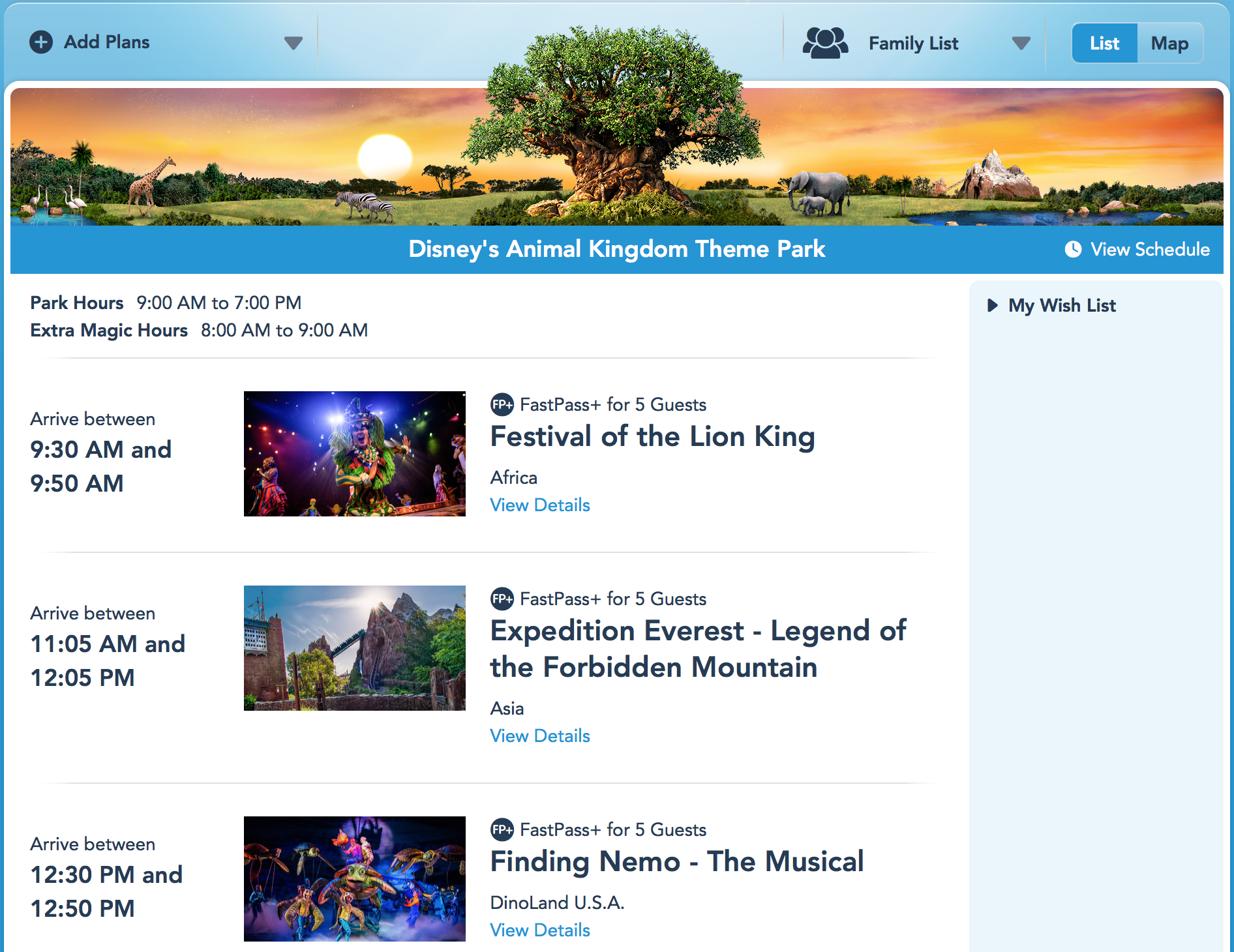
We are staying at the Animal Kingdom Lodge, which is owned by Disney, so 60 days before our vacation I logged into My Disney Experience from my computer and booked my FastPasses for our entire vacation. It was really a pretty painless process, but it was a little complicated, so I thought I’d share a few tips and my favorite resources to find out more.
FastPass+ Tips
- If you haven’t already, be sure to download the Disney World Touring Plan Spreadsheet to plan out your trip. You will know exactly when to book your FastPass+ reservations.
- Right now, when you book your FastPass+, it automatically assigns you three times. Try to get the time for your hard-to-get attraction correct (Anna & Elsa, Toy Story Midway Mania, etc.). You can go back in and change the times for the rest of the reservations later.
- Your FastPass+ reservation times can’t overlap. If you’re having trouble getting the time you want for one FastPass, make sure none of the other reservations for that day conflict.
- If there are lots of people in your party (grandparents, extended family, etc.), make sure you have connected all of their My Disney Experience accounts BEFORE your FastPass+ reservation date. If your other party members don’t have an account (your husband, kids, etc.), make an account for them that you manage through your account.
- Each person in your party needs to have a park ticket assigned to their account in order for you to make their FastPass+ reservations. (Otherwise it will say ‘Valid Park Admission Required’)
Best FastPass+ Resources
| Link to Website | Why I Love Them! |
|---|---|
| My Disney Experience | This is where you will go to make your FastPass+ reservations. Click on ‘My Disney Experience’ in the upper right-hand corner. Then click ‘FastPass+’. You have to make your initial reservations on a computer, but you can update your selections on your phone through the My Disney Experience app. |
| TheDibb | They have a great tool that will show you exactly when you can choose your FastPass+ and which attractions have FastPass+ availability. |
| Undercover Tourist | A comprehensive guide to FastPass+ and MagicBands – perfect for beginners |
| WDW Prep School | How to add, edit, and copy FastPass+ reservations. Also see their post about How to Tour All Disney Parks with FastPass+. |
Don’t miss the Best Gear for Traveling with Kids. Next, I am sharing a Free Printable Character Autograph Print! You can see the latest posts from this series by clicking here.
If you have anything to add to the conversation, don’t be shy! I would love to answer any of your Disney planning questions and if you share a tip I love, I might just include you in next month’s countdown.
—
Like what you see on our blog? Join our mailing list to receive emails with freebies, projects, coupons and decor ideas to help you live a creative and joy-filled life. You can also follow us on Facebook, Twitter and Pinterest.